COO
A business can pass an IT security risk assessment and still be exposed if it overlooks four recurring blind spots. Ownership, vendor access, legacy systems, and untracked accounts decide whether your security holds up in practice.
A checklist works by matching what exists against a fixed set of expected controls, so anything the list doesn't anticipate simply never gets checked. That's the mechanical flaw at the heart of most audits, and it's why passing an IT security risk assessment doesn't guarantee a business is actually protected.
Firewalls, antivirus, password policies — these are the categories every checklist asks about, since they're easy to define and easy to verify. Because they're easy to verify, they're also the ones attackers have learned to route around, leaving the less tidy risks untouched.
A stronger assessment has to look past what's convenient to measure. Stop at the boxes alone, and the hidden issues that actually leave systems exposed never surface.

Most businesses lean on checklists to structure their security reviews, and for basic controls that works well enough. The trouble starts once real-world scenarios stray from the script the checklist was built around.
Checklists are built to confirm technical controls and compliance requirements, not to track how people actually use systems or how everyday business processes quietly introduce new exposure. So a formal review can wrap up clean while real vulnerabilities sit untouched underneath it.
Take password strength: a checklist will confirm every user has a strong one, but it won't tell you whether someone who left the company six months ago can still log in and read sensitive files. That gap is every bit as dangerous as an unpatched server, even though no line item ever flags it.
Underneath all of this is a simple mismatch in speed — threats evolve faster than checklists get revised, and attackers specifically hunt for the gaps that standard assessments were never built to see. Closing that gap means looking past the basics to how the business actually runs day to day.
Even careful, well-run businesses keep tripping over the same handful of risks. None of these show up on a typical security risk assessment checklist; they're blind spots that persist quietly, letting a business pass every standard test while remaining genuinely exposed.
An assessment can surface a dozen real issues, but each one needs a named person accountable for fixing it, or it simply sits there. Too often findings get documented and filed, with no owner assigned and no deadline attached, so nothing actually changes.
Vendors frequently hold remote access to internal systems for support or maintenance, yet their accounts rarely get the same scrutiny as employee accounts. If those vendor credentials are ever compromised, an attacker can walk straight through them past every other defense in place.
Some old systems stay running for years because a single application still depends on them. Since they're often too old to receive security updates, they become easy targets, and keeping them online for that one application's sake can expose the whole network behind them.
The rule is simple — disable accounts the moment someone leaves — but practice is messier, especially when a departure is sudden or unplanned. The accounts left active afterward become a standing opportunity, exploitable by outside attackers or by the former employee alike.
Each of these gaps carries a real cost once it's left unaddressed, and a business can pass an audit on paper while still walking straight into a data breach or system compromise because none of them were ever closed.
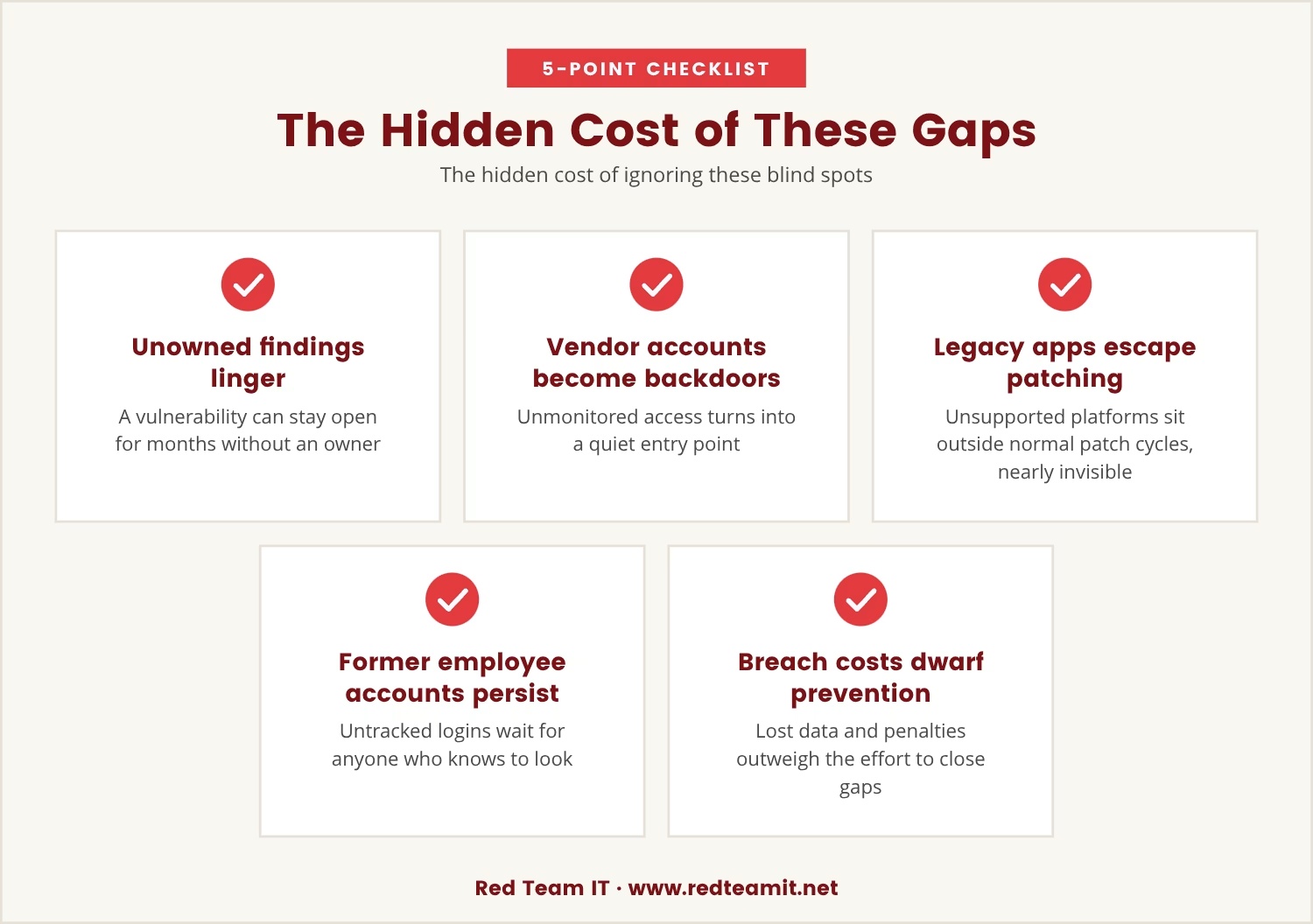
Follow the chain: no owner for a finding means a vulnerability can stay open for months. An unmonitored vendor account becomes a quiet backdoor. A legacy application on an unsupported platform sits outside the normal patching cycle, essentially invisible. And an untracked account from a former employee waits for anyone who knows to look for it.
None of this is hypothetical. These exact gaps have led to real incidents at organizations that believed, right up until the breach, that they were secure. Weighed against that, the cost of a breach — lost data, reputational damage, regulatory penalties — dwarfs the modest effort it takes to close these four gaps in advance.
Since the gaps are specific, the fix has to be specific too: a thorough IT security risk assessment in Denton needs to go past the basics and ask directly who owns each finding, how vendor access is managed, and whether legacy systems still justify staying online, alongside a check that departing employees' accounts are reliably disabled.
Denton businesses face the same threat landscape as much larger organizations, often with a fraction of the resources to manage it, which makes hunting down these hidden risks even more necessary rather than less. Identifying and closing them is what actually strengthens a security posture, rather than just the paperwork behind it.
An IT risk consultant familiar with the Denton business environment can help spot these blind spots directly and guide the broader IT risk management process so the assessment covers what genuinely matters.
None of the four recurring issues above require a complicated fix — just deliberate attention. These steps address them directly:
It's worth asking why these same issues resurface even in businesses that take security seriously, and the answer sits less in the assessment itself than in how daily operations actually run.
Standard assessments are built to be repeatable, which means they favor controls that can be measured cleanly — password length, firewall rules. Day-to-day operations are rarely that clean: people get busy, systems age quietly, and processes shift without anyone formally updating the record.
That mismatch plays out differently for each blind spot. Ownership goes unclaimed because nobody wants the extra work. Vendor access gets waved through because it feels temporary or outside the company's direct control. Legacy systems stay online because replacing them is expensive and disruptive. Departing-employee accounts get missed during busy stretches or periods of high turnover.
What ties all four together is that none of them can be solved with a single pass — they demand ongoing attention, which means building habits and processes that outlast the assessment itself.

Naming these four recurring blind spots is only the first step; recognizing them changes nothing unless it's followed by action that actually sticks.
Start by pulling up the last assessment and checking it against this list: did it cover ownership, vendor access, legacy systems, and departing-employee accounts? If any are missing, update the process now, assign clear responsibility for each one, and follow up until the work is actually done.
Closing these four gaps is what separates a checklist exercise from a security program that genuinely protects the business — and it's the difference between a passing grade on paper and real-world protection.

Many businesses with 5 to 150 employees, especially those with 50 or more users, find that standard assessments leave hidden risks unresolved. At Red Team IT, we understand how easy it is for these blind spots to persist, even when you’re following all the usual steps.
If you want to see how we approach these issues—or if you’d like to talk about your own setup—our team is ready to help you move beyond the checklist.
Switching MSPs? You get 20% off your first year with us—no strings attached—when you qualify as a new client.
A security risk assessment is a broad review of an organization's processes, people, and technology, built to identify where threats might originate, including human factors and business operations. A vulnerability scan is narrower and automated, checking systems for known technical flaws like missing patches or outdated software — useful, but focused on specific technical issues rather than the bigger picture.
Review and update the risk management process at least once a year, or sooner if the business sees major changes such as new technology, significant staff turnover, or new regulatory requirements. Regular updates keep the process aligned with how the business actually operates as it evolves.
Assigning ownership guarantees that someone is specifically responsible for fixing each issue an assessment uncovers. Without that clear accountability, problems get overlooked or delayed, leaving the business exposed to threats that could otherwise have been prevented.
A formal offboarding process should disable all accounts, collect company devices, and remove access to sensitive information immediately upon departure. Shared accounts and remote access tools need the same update, since those are easy to overlook and reduce the risk of unauthorized access after someone's gone.
Yes — legacy systems often stop receiving security updates, which makes them easier targets for attackers looking for a way in. Where these systems stay connected to the main network, a single compromise can spread well beyond the old application and affect the entire information system.
%2520(1).png)
.svg)